
If your team is switching between five different logins just to get one job done, including checking the CRM, then the accounting tool, then re-typing the same customer details into a marketing platform, you’re not alone. This is exactly the gap SaaS development is built to close. For UAE businesses running multiple cloud tools without them talking to each other, integration isn’t a “nice to have” anymore, it’s what separates a smooth operation from a team quietly drowning in copy-paste work.
This guide breaks down what SaaS integration actually means, how it works, and how to know when your business needs it.
What Is SaaS Integration?
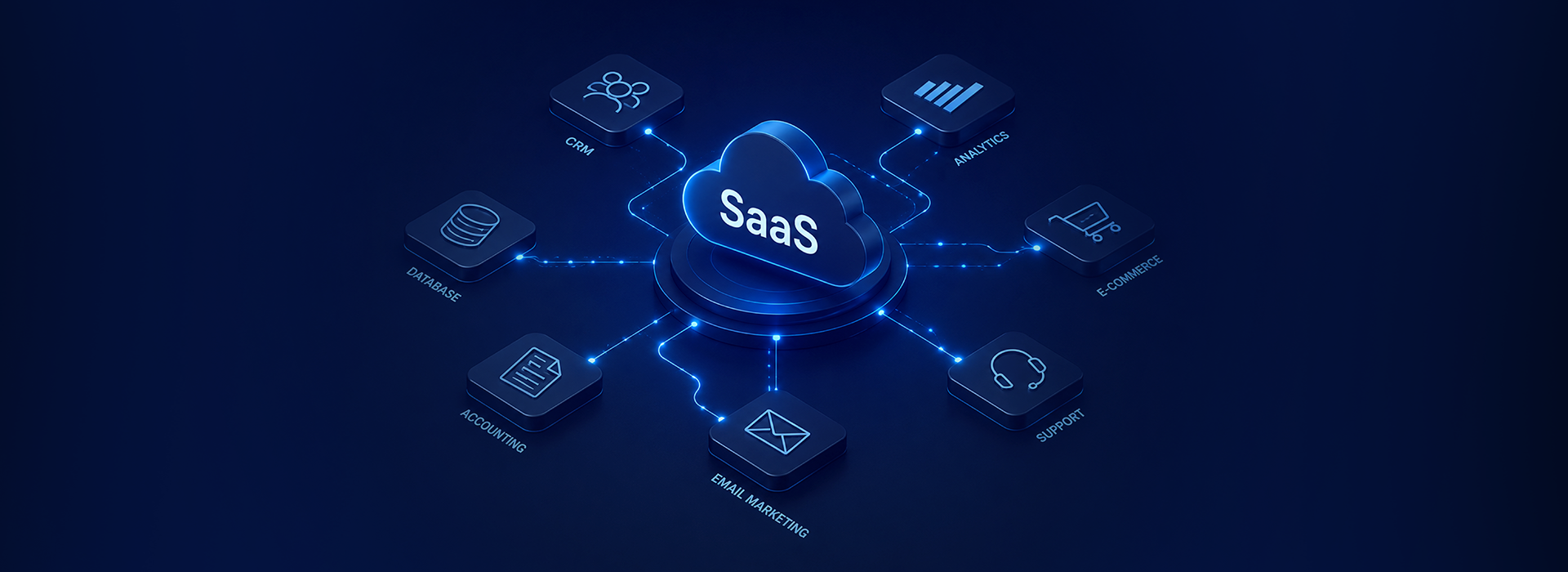
SaaS integration is the process of connecting different cloud-based software applications so they can share data and work together automatically, instead of operating as separate, disconnected tools.
- At its core, SaaS integration lets two or more cloud applications exchange data automatically, without anyone moving it by hand
- Without it, disconnected tools usually mean manual data entry, duplicate records, and reports that are always a step behind
- Once systems are properly connected, information updates across every platform on its own, no exports, no copy-paste, no chasing people to update a spreadsheet
In simple terms: when your CRM, accounting software, and marketing platform are integrated, updating a customer record in one place updates it everywhere it needs to be.
How Data Actually Flows Between Systems
Once systems are connected, data typically moves in one of two ways:
- One-way sync– Data flows from one system into another (for example, new leads from a marketing tool flowing into your CRM)
- Two-way sync– Data updates in both directions, so a change in either system reflects in the other automatically
This ongoing exchange is what enables real data synchronization across your business, no exports, no manual uploads, no waiting for someone to update the sheet.
Common SaaS Integration Use Cases
SaaS application integration shows up in almost every part of a modern business. Some of the most common examples include:
- CRM and marketing platforms: New leads captured in a marketing tool automatically create contacts in the CRM
- CRM ERP integration: Sales orders in the CRM automatically update inventory and finance records in the ERP system
- E-commerce and accounting: Online orders sync directly into accounting software, so invoices generate without manual entry
- HR and payroll: Employee data entered once in an HR system flows into payroll without re-typing
- Support tools and CRM: Customer support tickets link back to the customer’s full record, so every team sees the same history
Each of these is a small example of business system integration doing the repetitive work that used to sit with a person.
Key Benefits of SaaS Integration
| Benefit | What It Means in Practice |
| Automation | Repetitive tasks like data entry and record updates happen without manual work |
| Real-time data sync | Every connected system reflects the same up-to-date information |
| Improved efficiency | Teams spend less time switching tools and re-entering data |
| Better data accuracy | Fewer manual entries means fewer typos, duplicates, and mismatches |
| Faster decision-making | Reports pull from synced, current data instead of outdated exports |
These SaaS integration benefits compound over time, the more systems a business runs, the more hours integration saves every single week.
API Integration and iPaaS, Explained Simply
Two terms come up constantly around SaaS application integration, and both are simpler than they sound:
- API integration: An API is essentially a messenger that lets two applications “talk” to each other and exchange data in a structured way. Most modern SaaS integrations run on APIs behind the scenes.
- iPaaS (Integration Platform as a Service): A tool that connects multiple applications through pre-built workflows, without requiring custom code for every connection. It’s often the easiest route to reliable SaaS integration solutions for businesses without a large technical team.
APIs are the connection itself, and iPaaS is a platform that helps businesses set up and manage many of those connections in one place.
Common SaaS Integration Challenges
Integration isn’t always plug-and-play. Businesses commonly run into:
- Inconsistent data formats: Different systems structuring the same information differently, causing sync errors
- Limited or paid API access: Some platforms restrict how much data can be pulled or pushed, or charge extra for it
- Security and access concerns: Connecting systems means deciding carefully who and what can access sensitive data
- Maintenance over time: Software updates on either side of an integration can break the connection if it isn’t monitored
Knowing these SaaS integration challenges upfront helps businesses plan realistically instead of assuming integration is a one-time setup with zero maintenance.
Best Practices for a Smooth Integration
- Map out exactly which systems need to talk to each other, and why, before choosing a tool
- Start with the integration that saves the most manual hours, not the most technically interesting one
- Choose reliable SaaS integration services or an iPaaS platform over custom-built connections where possible, for easier long-term maintenance
- Test data flow with a small sample before connecting systems fully
- Review and monitor integrations periodically, rather than assuming they’ll run untouched forever
When Does Your Business Actually Need SaaS Integration?
A few clear signs it’s time to look into SaaS automation and integration:
- Your team manually exports and imports data between two or more tools regularly
- Customer or order information doesn’t match across systems
- Reporting takes hours because data has to be pulled and combined manually
- You’ve added new software, but it still operates as its own separate island
If more than one of these sounds familiar, disconnected systems are likely costing more time than most businesses realise.
Stop Letting Your Tools Work Alone
Disconnected SaaS tools quietly cost businesses time, accuracy, and clarity every single day. The right integration setup turns separate systems into one connected workflow, less manual work, fewer errors, and reporting you can actually trust.
At Weft Technologies, as a Saas development company in india, we help UAE businesses connect their CRM, ERP, accounting, HR, and marketing platforms into one smooth, automated system. If your tools still don’t talk to each other, get in touch with Weft Technologies and let’s map out what integration could save your team.